
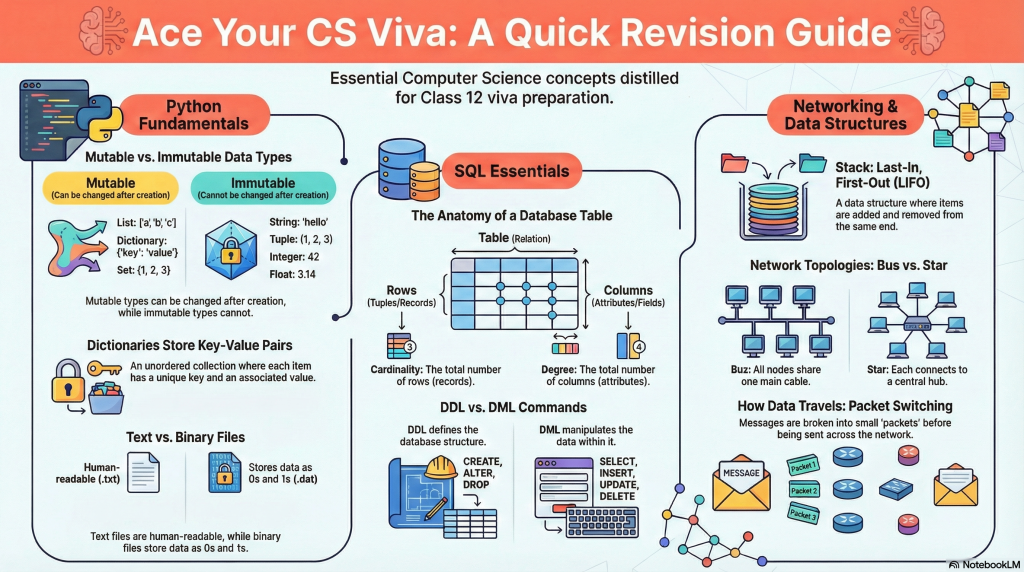
This CBSE Class 12 CS Viva Cheat Sheet serves as a condensed last-minute revision roadmap for students preparing for the Computer Science Practical Exam 2026. This comprehensive guide covers the most expected Class 12 Computer Science Viva Questions, focusing on the essential pillars of Python programming, database management, and networking. It systematically defines the distinction between mutable vs immutable data types, explains the mechanics of function parameters, and compares the specific modules required for File Handling (Text, Binary, and CSV).
The guide also clarifies the structure of relational databases by distinguishing between SQL DDL vs DML commands, while providing a clear hierarchy of database keys and table properties. Finally, it outlines foundational concepts in data structures, such as Stack LIFO operations, alongside critical networking topologies and protocols and the core logic for Python-MySQL connectivity. Use this ready-to-print CS viva cheat sheet PDF to master common examiner questions and explain your project logic with confidence.
🐍 1. PYTHON BASICS & DATA TYPES
| Concept | Definition/Key Point | Example/Output |
|---|---|---|
| Variable | A named location to store data in memory. | x = 10 |
| Mutable | Values can be changed after creation. | Lists, Dictionaries, Sets. |
| Immutable | Values cannot be changed. | Int, Float, String, Tuple. |
| Range Loop | range(start, stop) excludes the ‘stop’ value. | for i in range(3,5): print(i)Output: 3, 4 |
List append() | Adds a new value to the end of a list. | list.append(3) |
String split() | Splits string into a list based on a separator. | "a,b".split(',') → ['a', 'b'] |
| Dictionary | Unordered collection of Key:Value pairs. | {'name':'Riya', 'sal':25000} |
| Stack | A linear data structure in which insertion and deletion of values are done at one end only. | |
| List | Is a container that are used to store a list of values of any type | To add a new value in a list : list=[1,2] / list.append(3) To change a value Items = [10,20,30,40]/ Items[3] = 100/print(Items) Output:[10,20,30,100] |
| Tuple | It is a sequence of immutable objects | len() — data=(10,20,30,1) / print(len(data)) |
⚙️ 2. FUNCTIONS & SCOPE
- Function: A subprogram that acts on data and often returns a value.
- Advantages: Code sharing and reusability.
Parameters vs. Arguments
- Formal Parameter: The variable in the function definition.
- Actual Argument: The value passed during the function call.
⚠️ The Rule of Default Arguments
“A default argument must not be followed by a non-default argument.”
- ✅ Valid:
def interest(p, r=8.5, t=15) - ❌ Invalid:
def interest(p, r=8.5, t)
Example of formal and actual parameter
def test(x): # variable X is parameter or formal
   r=2*x # parameter or formal argument
   print("The result is=",r)
a=int(input("enter any no="))
test(a) #variable a is argument or actual parameters or actual arguments
Global variable
Variable defined outside all functions and accessible among the whole program are global variables.
Local variable
Variables which are Accessible only inside the functional block where it is declared are the local variables.
def area(length,breadth) :
   a=length * breadth #a is local to function area so a is local variable
   return a
l=int(input("Enter the length ="))
b=int(input("Enter the breadth ="))
ar=area(l,b) #variable l, b,ar of global scope and are global variables
print("area=",ar)
📂 3. FILE HANDLING
The Three File Types
- Text File: A file whose contents can be viewed using a text editor is called a text file.
- CSV File: Comma-Separated Values file is a a simple text file used to store data in a table-like format. In this file, each line represents a row, and a comma is used to separate the different pieces of information (columns) within that row.
- Binary Files: A binary file stores the data in the same way as stored in the memory. i.e. data is stored according to its data type so no translation occurs
- Both load() (for reading) and dump() (for writing) functions are defined in the pickle library.
- f=open(“list.dat”,”wb”) //file opened for writing
| Feature | Text File (.txt, .csv, .rtf) | Binary File (.dat) | CSV File (.csv) |
|---|---|---|---|
| Readable? | Yes (Human-readable). | No (Machine code/Memory). | Yes (Tabular data). |
| Module | Built-in (no import needed). | import pickle | import csv |
| Write Fn | write(), writelines() | pickle.dump() | writer(), writerow(), writerows() |
| Read Fn | read(), readline(), readlines() | pickle.load() | csv.reader object |
- Note:
readlines()returns a list of lines. The default mode for opening a file is read ('r'). E.g. myfile = open(“story.txt”) - Syntax: f = open(“b.txt”, ‘w’) / line1 = ‘India is a country of Asia’ / f.write(line1)
🗄️ 4. SQL (DATABASE)
Key Terminology
- Tuple: A Row in a table.
- Attribute: A Column in a table.
- Degree: Number of Columns.
- Cardinality: Number of Rows.
Keys Hierarchy
- 🔑 Candidate Key: Any attribute capable of being a Primary Key.
- 🔑 Primary Key: The chosen column that uniquely identifies a record.
- 🔑 Alternate Key: Candidate keys that were not selected as Primary Key.
Difference between SQL and MySQL
SQL is Structured Query Language and MySQL is a database management system. MySQL uses SQL in order to access databases.
DDL vs. DML
- DDL: Data Definition Language
- DML: Data Manipulation Language
| DDL (Structure) | DML (Data) |
|---|---|
CREATE, ALTER, DROP | SELECT, INSERT, UPDATE, DELETE |
Commands
| Command | Usage Example |
|---|---|
| Pattern Matching | SELECT * FROM Student WHERE Name LIKE 'A%' |
| Range Search | SELECT * FROM Student WHERE class BETWEEN 4 AND 6; |
| Remove Duplicates | SELECT DISTINCT class FROM student; |
| Ordering | SELECT * FROM Student ORDER BY class; |
| Grouping | SELECT Dept, sum(salary) FROM emp GROUP BY Dept; |
| Alter Structure | ALTER TABLE table_name ADD slno int AFTER rollno; |
| Update Data | UPDATE student SET class="V" WHERE firstname="Riya"; |
| Create table | CREATE TABLE student (lastname varchar(15),firstname varchar(15), city varchar(20), class char(2)); |
- Pattern Matching: Use
LIKE. Example:WHERE Name LIKE 'A%'(finds names starting with A).
| CHAR | VARCHAR |
| 1. Fixed length string 2. Used where number of character to enter is fixed like Grade, EmpCode, etc 3. Fast, no memory allocation every time 4. It takes more memory | 1. Variable length string 2. Used where number of character to be enter is not fixed like name address etc. 3. Slow, as it take size according to data so every time memory allocation is done 4. It takes less space |
🌐 5. NETWORKING & DATA STRUCTURES
Data Structure: The Stack
- Definition: Linear structure.
- Principle: LIFO (Last In, First Out).
- Operations: Insertion and deletion occur at one end only.
Topologies
- 📉 Bus: All nodes connect to a single main cable (Backbone).
- ⭐ Star: All nodes connect to a central device (HUB) via separate cables.
Switching Techniques
- Packet Switching: Data is broken into small chunks (packets) and sent independently.
- Circuit Switching: A complete physical connection is established before transmission.
Web & General Concepts
• Web Browser: Software that interprets HTML documents and displays them in human-readable form (e.g., Chrome, Edge, Safari).
• Front-end: Refers to the User Interface.
• Back-end: Refers to the Server.
• Wireless Networks: Uses radio waves, infrared, microwave, or satellite.
Acronym Bank
| Acronym | Full Form & Description |
|---|---|
| LAN | Local Area Network (Room/Building/Campus). |
| MAN | Metropolitan Area Network (City-wide). |
| WAN | Wide Area Network (Country/Continent). |
| TCP/IP | Transmission Control Protocol / Internet Protocol. |
| FTP | File Transfer Protocol. |
| PPP | Point-to-Point Protocol. |
| HTTP | Hypertext Transfer Protocol. |
| SMTP | Simple Mail Transfer Protocol (Standard for sending mail). |
| POP3 | Post Office Protocol v3 (Receiving emails from remote server). |
| IMAP4 | Internet Mail Access Protocol v4. |
| VoIP | Voice over Internet Protocol (Voice comms over IP). |
| GPRS | General Packet Radio Services (Packet-based wireless tech for GSM). |
| GSM | Global System for Mobile Communication. |
| CDMA | Code Division Multiple Access. |
| WLL | Wireless Local Loop. |